There is a specific point in a fan’s life where it stops being a quiet background presence and becomes the most irritating object in the room. It usually starts small: a soft tick every few seconds. Then it becomes a rhythmic click as the fan sweeps side to side. Eventually it turns into a rattle, a grind, or a stutter at the end of each oscillation cycle.
If that describes your tower fan right now, the good news is that the cause is usually identifiable. Different sounds point to different parts, and many of them are fixable at home without tools or technical skill. Others mean the fan is genuinely on its way out, and knowing that early saves you a lot of pointless fiddling.
Here is what your fan is actually telling you, and what to do about each sound.
Step 1: Identify Which Sound You Actually Have
Before you take anything apart, listen carefully and note the timing. This is the single most useful piece of diagnostic information.
- Clicking only when the fan oscillates: the oscillation gearbox, linkage arm, or rotating base
- Constant rattling regardless of oscillation: a loose grille, base, fastener, or an unbalanced blade
- Grinding or growling: worn motor bearings or debris in the motor housing
- Squeaking or a soft chirp: dry bearings or a dry bushing in the rotating base
- Ticking that speeds up with fan speed: blade contact or debris touching the moving blades
Manufacturer troubleshooting guidance makes this exact distinction, noting that clicking during an oscillation sweep generally indicates a gear or linkage issue, while constant rattling typically comes from something loose or unbalanced. clicking during oscillation can indicate a gear or linkage issue, while rattling comes from loose parts or an unbalanced blade
Cause 1: Something Is Loose (The Easy Fix)
This is the first thing to check because it is free, takes two minutes, and resolves a surprising number of cases.
Fans vibrate constantly, and constant vibration loosens screws, clips, and joints over time. A loose grille panel, a slightly loose base connection, or a pole joint that has worked its way slack can all produce a persistent rattle that sounds far more serious than it is.
What to do:
- Unplug the fan first, always
- Check and hand-tighten every visible screw, especially on the base and rear housing
- Tighten pole joints if you have a pedestal fan – loose pole connections are a known cause of creaking and clicking during oscillation
- Re-seat the front and rear grilles and confirm they are properly aligned before tightening
- Check the base feet and make sure the fan sits flat and does not rock
Manufacturers specifically call out loose pole connections and grille misalignment as causes of oscillation noise, including the subtle vibration that follows a grille that was removed for cleaning and put back slightly off.
An unstable surface matters too. A fan sitting slightly unevenly can develop a rhythmic thud from the rotor shifting inside the motor housing, and in some cases simply adjusting the base so the fan sits level eliminates the noise entirely.
Cause 2: Dirt and Dust Buildup
Dust is the silent killer of quiet fans. It accumulates on blades, inside the grille, around the motor shaft, and in the oscillation mechanism. Over time it unbalances the blades, adds friction to moving parts, and creates a rough, uneven sound that gets worse as the fan heats up.
Manufacturer support pages list dust buildup as one of the leading causes of clicking, rattling, squeaking, and grinding in fans. dust buildup, a loose grille, an unstable base, and blade contact are common causes of fan noise
What to do:
- Unplug the fan and remove the front grille if your model allows it
- Vacuum or brush the blades gently with a soft brush or a vacuum on low suction
- Clean around the motor shaft and the base joint
- Use compressed air carefully around hard-to-reach areas, holding the can upright
- Clean the oscillation mechanism if you can access it without disassembling anything critical
This is worth doing every few months regardless. A clean fan is not just quieter. It also moves air more efficiently, which means you can run it at a lower, gentler speed for the same cooling effect.
Cause 3: Worn Oscillation Gears (The Classic Clicking)
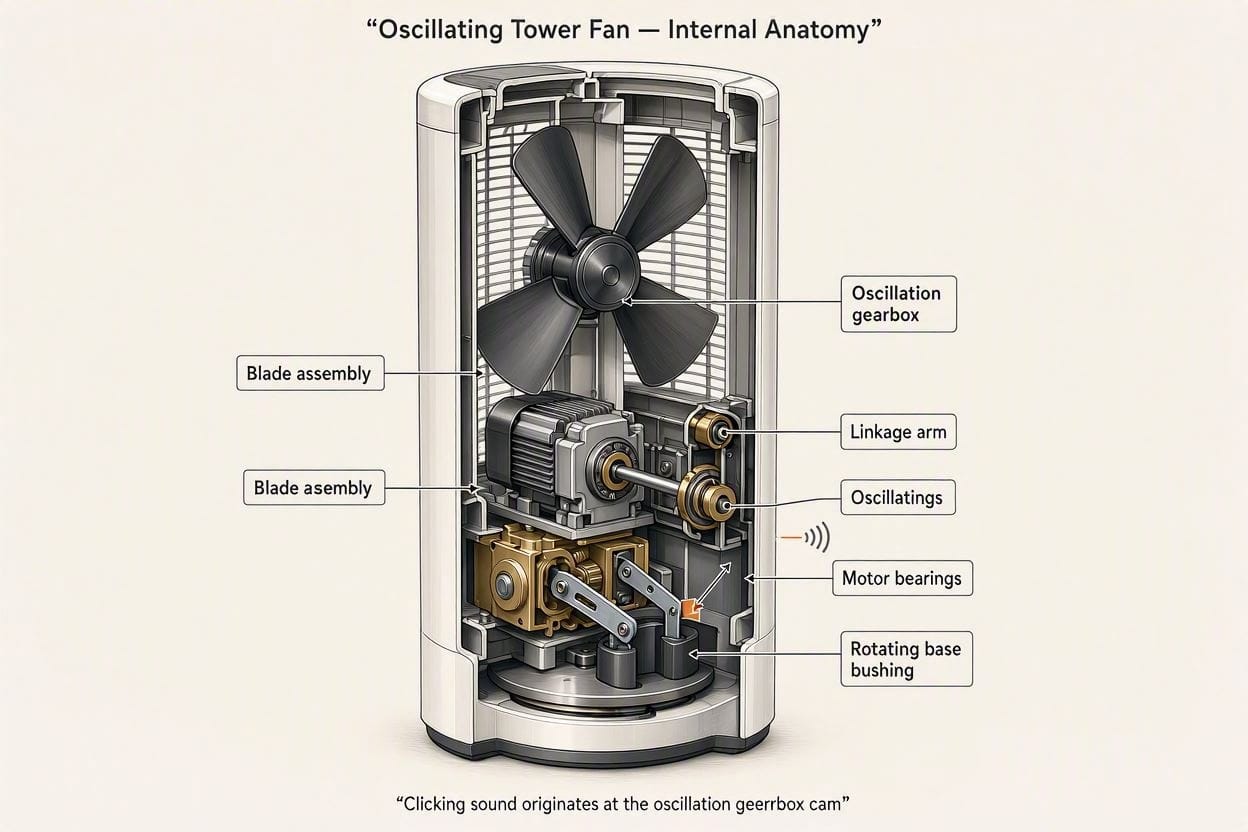
If your fan clicks in a steady rhythm only while sweeping side to side, this is almost certainly the cause. The oscillation gearbox sits at the back of the motor housing and translates the motor’s rotation into a slow side-to-side sweep. Inside are plastic gears that mesh together thousands of times per season.
Plastic gears wear, strip, or lose teeth. A clutch mechanism inside can also get stuck between positions. The result is a rhythmic “click-click-click” that syncs with the sweep, sometimes accompanied by a stutter or jerk at the end of the fan’s travel.
What to do:
- Unplug the fan and let it sit for a few minutes
- Remove the rear motor housing if your model allows access without voiding anything
- Locate the small oscillation gearbox behind the motor
- Inspect the plastic gears for missing teeth, cracks, or trapped debris
- Clear any debris caught in the gear teeth or the linkage arm
- Apply white lithium grease sparingly if the gears are intact but dry
One important warning: use grease sparingly. Excess grease attracts dust, which accelerates wear and can make the problem worse within weeks. A thin film is enough.
If the gear teeth are visibly stripped or the linkage arm is cracked, this is not a lubrication problem. Those are physical failures, and no amount of grease will restore them.
Cause 4: Worn Bearings and Bushings
Bearings and bushings are what allow the motor shaft and the rotating base to spin smoothly. When they wear out or dry out, you get grinding, growling, or a soft squeaking sound that persists regardless of whether the fan is oscillating.
This is a more serious category of problem than a loose screw, but it is not always terminal.
What to do:
- Check for bearing play by gently testing whether the shaft has lateral movement
- Lubricate the motor bearings with a light machine oil if you can access them
- Lubricate the rotating base bushing where it meets the pole or base
- Look for a worn bushing in the rotating base, which is a documented cause of oscillation noise
Worn bushings in the rotating base are specifically identified as a cause of persistent oscillation noise in fans. a worn bushing in the rotating base can cause clicking during oscillation
If the motor bearings are genuinely shot, the noise will not respond to lubrication and will get progressively worse. At that point you are looking at a motor replacement, which is usually not economical on a mid-range tower fan.
Cause 5: Debris, Blade Contact, or a Bent Blade
Sometimes the answer is embarrassingly simple. A small object caught behind the grille, a slightly bent blade, or a piece of plastic touching the moving blades can all create a rhythmic tick or click that sounds mechanical and severe.
Debris stuck in the blades, worn bearings, misaligned blades, and loose fittings are all commonly cited causes of fan clicking, along with accidental knocks during cleaning or moving that bend a blade slightly out of alignment.
What to do:
- Unplug and inspect the blade area with a torch
- Remove any trapped debris carefully with tweezers or a soft brush
- Check each blade for bends by comparing them visually
- Check whether anything is touching the blades as they rotate – a cable, a plastic ridge, or a misaligned grille tab
If a blade is bent, you can sometimes straighten it gently by hand. If it is cracked or badly deformed, replacement is usually the only real fix.
When To Stop Fixing and Replace the Fan
Not every fan is worth saving, and knowing when to walk away is part of the process. Consider replacing rather than repairing if:
- The motor itself is grinding or growling persistently
- The oscillation gears are visibly stripped or the linkage arm is cracked
- The fan has developed an electrical smell, is running hot, or has a frayed cable
- It is under warranty – most models cover defects, and opening the housing may void it
- The math does not work – a repair part often costs a meaningful fraction of a new fan
Safety matters here. Never operate a fan with a damaged motor, a frayed power cable, or any sign of overheating. And if your fan is still under warranty, check the terms before taking it apart, because disassembly can void coverage.
If you are replacing it anyway, this is a good moment to buy something genuinely quieter. Our guide to quiet tower fans covers which models use DC motors and better damping to stay calm at the volume you actually want to sleep at. Coverage of tower fans for larger rooms is also useful if the old fan was always working hard to move enough air.
How To Prevent the Clicking From Coming Back
A few habits will keep a fan running quietly for years instead of months:
- Clean it every 2-3 months, more often if you live in a dusty environment or have pets
- Check and tighten screws at the start of each cooling season
- Keep it on a stable, level surface away from carpet edges and uneven flooring
- Do not run it at maximum speed constantly if you do not need to – sustained high-RPM running accelerates wear on bearings and gears
- Store it properly in the off-season, ideally covered, to prevent dust settling into the mechanism
For a longer-term solution, keep the acoustic basics in mind. Even a perfectly maintained fan will sound louder in a room full of hard, reflective surfaces. If your bedroom echoes, adding a rug, heavier curtains, and soft furnishings will make the same fan noticeably less intrusive. That principle is covered in how to reduce echo in a living room and it applies to bedrooms just as well.
Final Thoughts
A clicking tower fan is almost never a mystery. The sound tells you where the problem is. Clicking only during oscillation points to the gearbox or linkage. Constant rattling means something is loose or unbalanced. Persistent grinding means bearings. A rhythmic tick that gets faster means blade contact or debris.
Start with the free fixes: tighten everything, clean it properly, and make sure it sits level. Move to the gearbox if the clicking is sweep-synced. Accept that some fans are simply ready to be replaced, and that a good quiet replacement is often a better use of your money than chasing a repair on a worn-out motor.
Either way, you do not have to live with the noise. You just have to listen a little more carefully to what the fan is saying.
Frequently Asked Questions
Why Does My Tower Fan Click Only When it Oscillates?
That pattern almost always points to the oscillation mechanism. Worn or stripped plastic gears, a dry gearbox, a cracked linkage arm, or a worn bushing in the rotating base are the usual causes.
Can I Fix a Clicking Fan Myself?
Often, yes. Tightening loose screws, cleaning out dust, making sure the fan sits level, clearing debris, and applying a small amount of white lithium grease to the oscillation gears resolve many cases.
What Does it Mean If My Fan Rattles Constantly Instead of Clicking?
Constant rattling usually means something is loose or unbalanced rather than a gear problem. Check the grille, base, fasteners, and blades for looseness or imbalance.
Is it Safe to Keep Using a Noisy Fan?
If the noise is mechanical friction from a loose grille or dry gears, it is usually not dangerous, just annoying. But if the fan smells like burning, runs hot, has a damaged cable, or is grinding badly, stop using it and replace it.
How Do I Stop My Fan From Clicking in the Future?
Clean it every few months, tighten the screws at the start of each season, keep it on a stable level surface, avoid running it at maximum speed constantly, and store it covered during the off-season.

Ememobong is the lead researcher and editor at Quiet Dwelling. As a professional technical writer, he specializes in breaking down complex acoustic engineering concepts into simple, actionable steps. His goal is to help people build distraction-free environments for better sleep and deep work.